“AI, Privacy & Infrastructure — A Non-Technical Journey

  • 4 Prompt Engineering Techniques Explained: CoT, ToT, ART, RAG

    4 Prompt Engineering Techniques Explained: CoT, ToT, ART, RAG

    Introduction

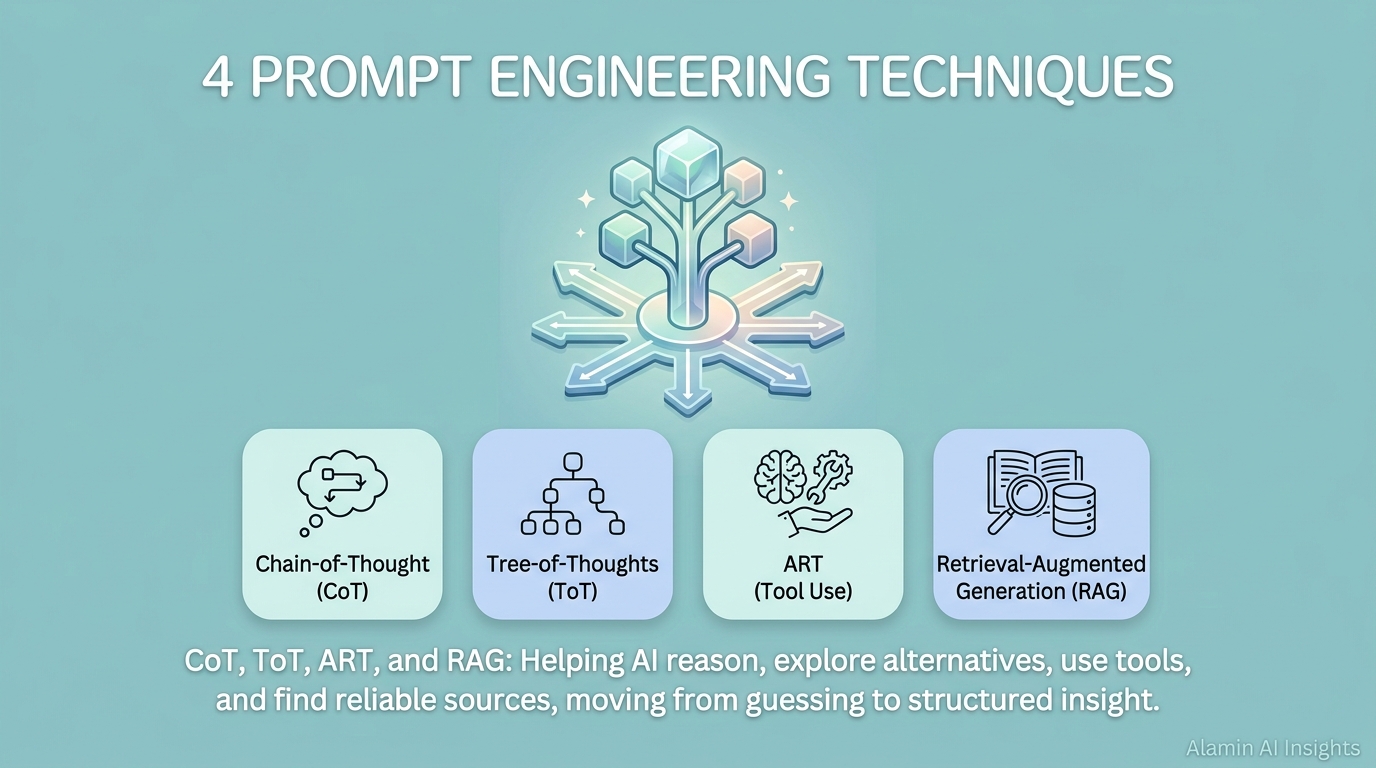
    Ask an AI a hard question, and it will almost always give you a confident answer. The problem is that “confident” and “correct” are not the same thing. Over the last few years, researchers have developed specific, well-tested prompt engineering techniques that make AI models slow down, explore alternatives, use real tools, and check real sources before answering — instead of just guessing fluently. Four of the most important ones are Chain-of-Thought (CoT), Tree-of-Thoughts (ToT), Automatic Reasoning and Tool-use (ART), and Retrieval-Augmented Generation (RAG). Here’s what each one actually does — illustrated with a short story, and backed by the real data from the papers that introduced them.

    1. Chain-of-Thought (CoT): Making the AI Show Its Work

    Inspector Reya had a reputation: she never announced a suspect’s name until she’d walked the room out loud, step by step, in front of everyone. A young officer once asked her why. “Just tell us who did it,” he said. “You already know.”

    “I don’t know until I’ve said it,” she replied. She stood at the center of a study where a wealthy merchant had been found dead. “First — the door was locked from the inside. That means whoever did this either had a key, or never left.” She paused. “Second — his tea was still warm, so the killer was here recently.” Another pause. “Third — only three people had keys: the wife, the butler, and the merchant himself. The wound is on the back of his skull — impossible to inflict on oneself. So it’s the wife or the butler.” She continued through the alibi of the butler, seen by two witnesses at the market, and finally the widow’s bruised knuckles, consistent with swinging something heavy. The wife confessed before Reya even finished speaking.

    “You probably suspected her from the start,” the officer said. “Why not just say so?”

    “If I say the name first, I stop looking for what proves me wrong,” Reya said. “Walking it out loud is how I catch the moment my own theory doesn’t hold up — before it’s too late to change my mind.”

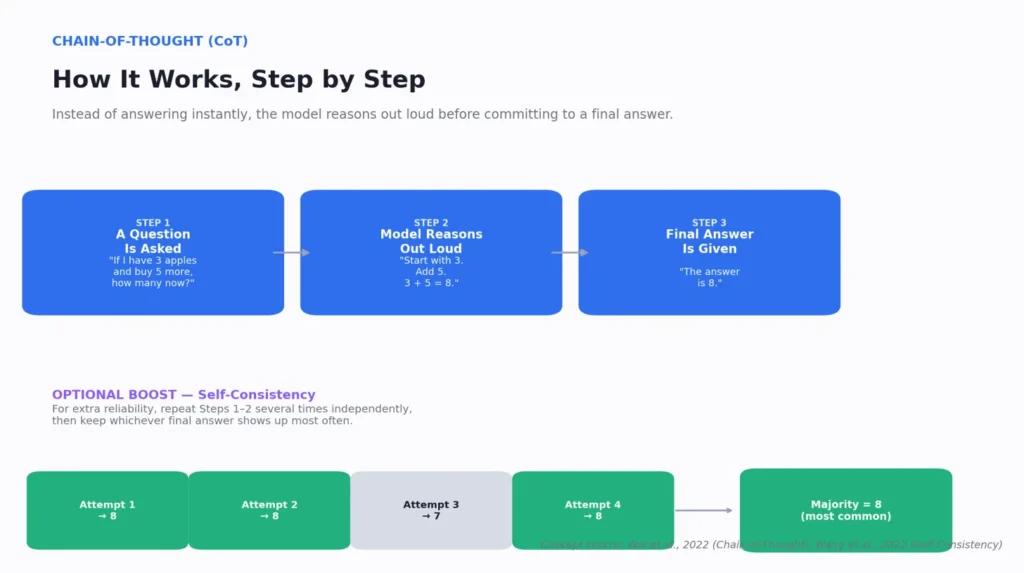
    This is Chain-of-Thought prompting. Instead of jumping to a final answer, you ask the model to reason step by step — the way Reya walks the room instead of blurting a guess. You trigger it with something as simple as adding “think step by step” or “explain your reasoning before answering” to your prompt.
    Prompt Engineering CoT

    this prompt engineering Technique has been Introduced by Wei et al. (2022), CoT was later strengthened by Wang et al. (2022) with a second, separate step called self-consistency. Here’s the distinction: CoT gets the model to show one reasoning path. Self-consistency asks it to run that same CoT process multiple times independently — typically 5 to 10 times — and then takes whichever final answer shows up most often, the way you’d trust an answer five colleagues independently reached over one hasty guess. In practice, this means sending the same CoT-style prompt several times (or explicitly asking “solve this three separate times with independent reasoning, then tell me the most common final answer”) and comparing the results yourself, rather than accepting the first attempt.

    Tested on PaLM-540B, layering self-consistency on top of CoT consistently beat plain greedy CoT alone, as the chart below shows:

    On problems with multiple steps, reasoning out loud — and checking that reasoning against itself — measurably reduces wrong answers, sometimes by close to 18 percentage points.

    2. Tree-of-Thoughts (ToT): Exploring Multiple Paths Before Committing

    Old Yusuf had been a locksmith for forty years. His apprentice Farid kept grabbing the first key that looked close enough and jamming it in, again and again, hoping. “You’re guessing in a straight line,” Yusuf told him. He laid out five keys instead, and tested each one’s shape against the lock with just a shallow push. “This one’s too thick — dead end, discard it.” The second seated but felt wrong past the first notch — “promising shape, wrong details, I’ll keep it in mind.” The third he pushed further, past where the others failed, until a ridge caught. “This is the one worth committing to.”

    “You could have just tried all five in order,” Farid said.

    “I did try all five,” Yusuf replied. “But I didn’t waste full effort on ones that failed early. If the third key had also failed, I wouldn’t start over — I’d go back to the second, which I hadn’t fully ruled out yet.”

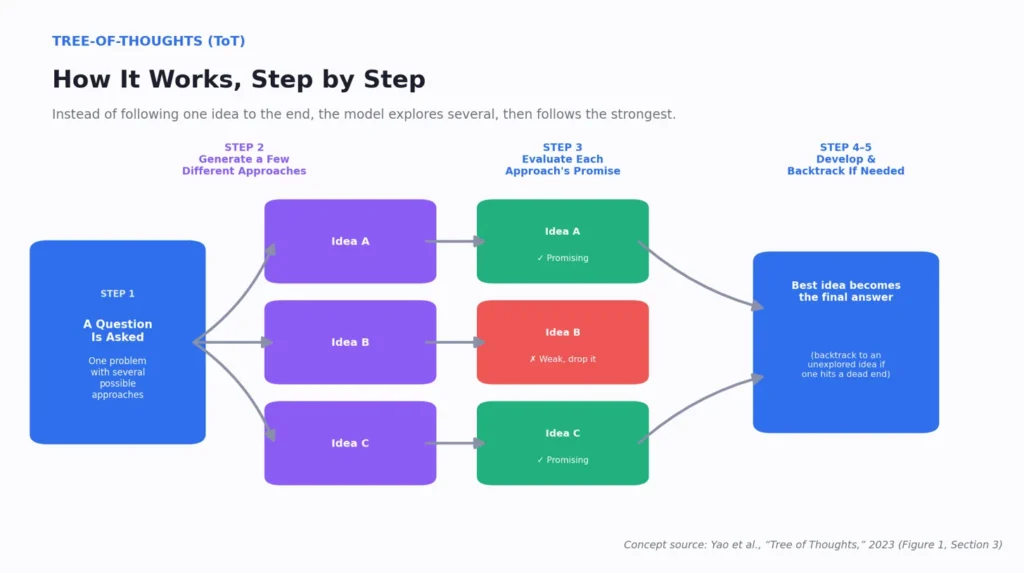
    This is Tree-of-Thoughts, introduced by Yao et al. (2023). Instead of committing to one line of reasoning, the model generates several possible next steps, evaluates which look promising, abandons the weak ones early, and goes deeper only on survivors — backtracking to an unexplored branch, not restarting from zero, if a path fails. The paper tested this on the “Game of 24” — combining four numbers with arithmetic to reach exactly 24 — where one bad first move dooms the whole attempt, as the results below make clear:
    Prompt Engineering ToT

    Concept Source: Yao et Al.. “Tree of Thought, 2023″(figure 1, Section 3)

    Plain CoT actually did worse than a direct guess here (4.0% vs. 7.3%) — a single bad first step doomed the chain with no way to recover. ToT’s ability to explore, prune, and backtrack turned a 7% success rate into 74%.

    3. ART (Automatic Reasoning and Tool-Use): Knowing When to Stop Guessing

    Dr. Amara had performed over two thousand surgeries. Mid-procedure, she paused entirely to check a digital infusion pump instead of estimating a dosage by feel. “I could recite the formula from memory right now,” she told her resident, Priya. “But ‘roughly’ isn’t good enough here — a small math error in my head could mean a patient stops breathing.” She read the pump’s exact number, adjusted the drip, and continued the surgery without missing a beat.

    “Doesn’t that make you look less confident?” Priya asked.

    “I can do the math,” Amara said. “The point is knowing the difference between reasoning I can trust my own head for, and calculations where a wrong guess, delivered confidently, is more dangerous than pausing to check. The surgeons who hurt patients aren’t the ones who don’t know enough — they’re the ones who trust memory in the exact moment a real tool was sitting right there, unused.”

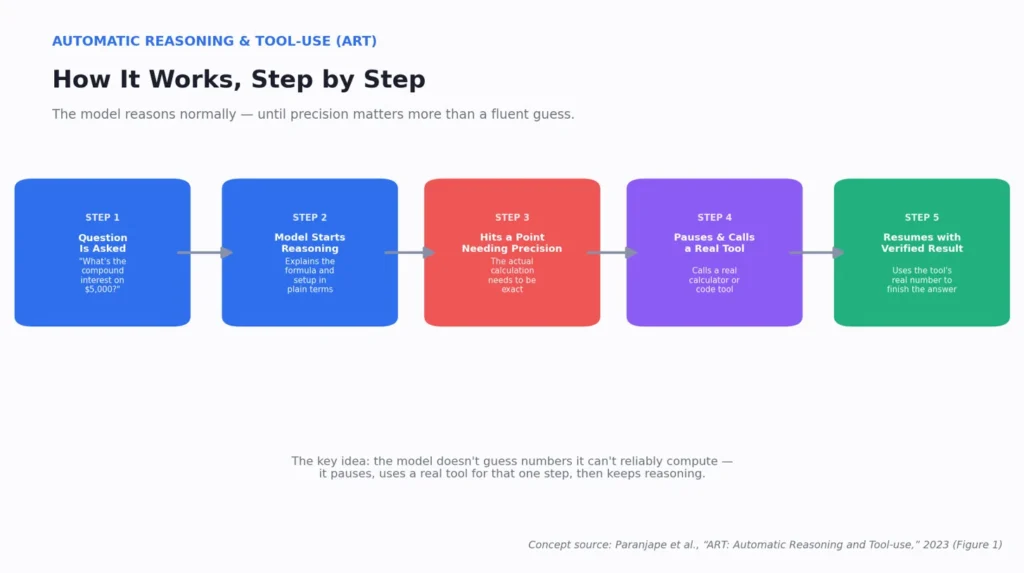
    This is ART, introduced by Paranjape et al. (2023): the model reasons normally most of the way through a task, but at the exact point where precision matters more than fluent guessing, it pauses, calls a real external tool — a calculator, code execution, a search API — and folds the verified result back into its reasoning. Tested across BigBench and MMLU, the gains (and one honest limitation) look like this:
    Prompt Engineering ART

    (Source: Paranjape et al., 2023, Table 2 summary) That last row matters — ART didn’t win everywhere; hand-tuned GPT-3 setups with highly specific demonstrations still beat it on some tasks. But the core finding held: letting a model reach for a real tool instead of estimating silently closed a measurable gap, especially on arithmetic tasks, where tool use alone added over 21 points on average.

    4. RAG (Retrieval-Augmented Generation): Answering From Real Sources, Not Memory

    Professor Adaeze had studied land disputes for thirty years and could recite most of the record from memory. When a court asked her to testify about a 1952 boundary agreement, she asked for a recess instead of speaking. “I know the shape of this history,” she told the judge. “But ‘roughly’ isn’t testimony. If I’m wrong about even one clause, I could cost a family their land based on my own fuzzy recollection dressed up as certainty.”

    She returned with the actual 1952 document. “Everything I say next is still my analysis, my expertise — but it’s built on top of this, not instead of it.” A clerk later asked why she hadn’t just testified from memory, given how well she knew the material.

    “Because knowing a subject well is dangerous in exactly this way,” Adaeze said. “The better your memory, the more convincing your wrong answer sounds — to others, and to yourself.”

    This is RAG, introduced by Lewis et al. (2020): instead of answering from memorized, potentially outdated general knowledge, the model first retrieves actual relevant documents and builds its answer on top of that real material — the same way Adaeze builds her testimony on the real document, not her confident recollection of it. On open-domain question answering, RAG set new state-of-the-art results, as the chart below shows:
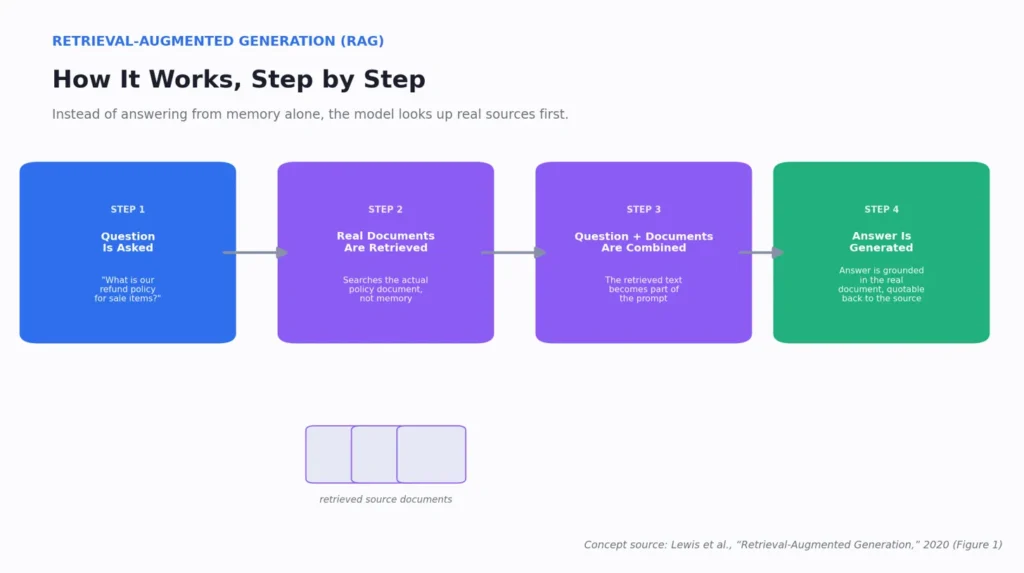
    Prompt Engineering RAG

    (Source: Lewis et al., 2020, Table 1)

    The researchers also found RAG’s answers were rated more factual and specific than a comparable model without retrieval — and the model’s knowledge could be updated just by swapping the document index, no retraining needed. Testing this with a 2016 vs. 2018 Wikipedia index on questions about world leaders, accuracy stayed high when the index matched the question’s timeframe (70% and 68%) but collapsed to single digits when it didn’t — direct proof the model was genuinely using the retrieved documents, not just its trained-in memory.

    What, How, Why, Where: Choosing the Right Technique

    Chain-of-Thought

    This Prompt Engineering Technique is the right default whenever a task has multiple dependent steps where an early mistake would silently corrupt everything after it — math word problems, multi-step logic, step-by-step debugging, or breaking down a complex decision. Use it by asking the model to “think step by step” before answering. For anything genuinely important, layer self-consistency on top: run the same request multiple times independently and go with the most common answer, rather than trusting a single pass. It’s overkill for simple factual lookups — “what year did X happen” doesn’t need a reasoning chain.

    Tree-of-Thoughts

    This Prompt Engineering Technique earns its extra complexity specifically when there’s more than one genuinely plausible approach and the “obvious” first idea might not be the best — strategic decisions, creative writing with multiple directions, puzzle-solving, or planning tasks where a wrong early commitment is costly to unwind. Use it by asking for several candidate approaches, a quick evaluation of each, and permission to abandon weak ones and go deeper only on survivors. It’s unnecessary when there’s really only one reasonable path forward — that’s just CoT with extra steps.

    ART

    This Prompt Engineering Technique belongs in the workflow whenever part of a task needs precision, current information, or computation a model can’t reliably produce from memory — financial calculations, unit conversions, live data lookups, or anything with a number that would be costly to get subtly wrong. This makes it especially valuable in technical problem-solving, data analysis, and software development, where “close enough” isn’t good enough. It’s wasted effort on purely creative or judgment-based tasks with nothing concrete to verify.

    RAG

    This Prompt Engineering Technique is essential whenever an answer depends on specific, current, or proprietary facts that general training knowledge can’t reliably contain — company policies, contracts, product documentation, recent news, research literature, or historical records with exact dates and figures. This makes it the backbone technique for research, technical writing, market research, and any customer-facing tool where a wrong fact has real consequences. It’s unnecessary for stable, well-known general knowledge that doesn’t hinge on a specific source.

    In short: reach for CoT as your everyday reasoning habit, ToT when you’re choosing between real alternatives, ART when precision or live data matters more than fluent guessing, and RAG whenever the truth lives in a specific document rather than general knowledge — and often, the strongest results come from combining more than one in the same task.
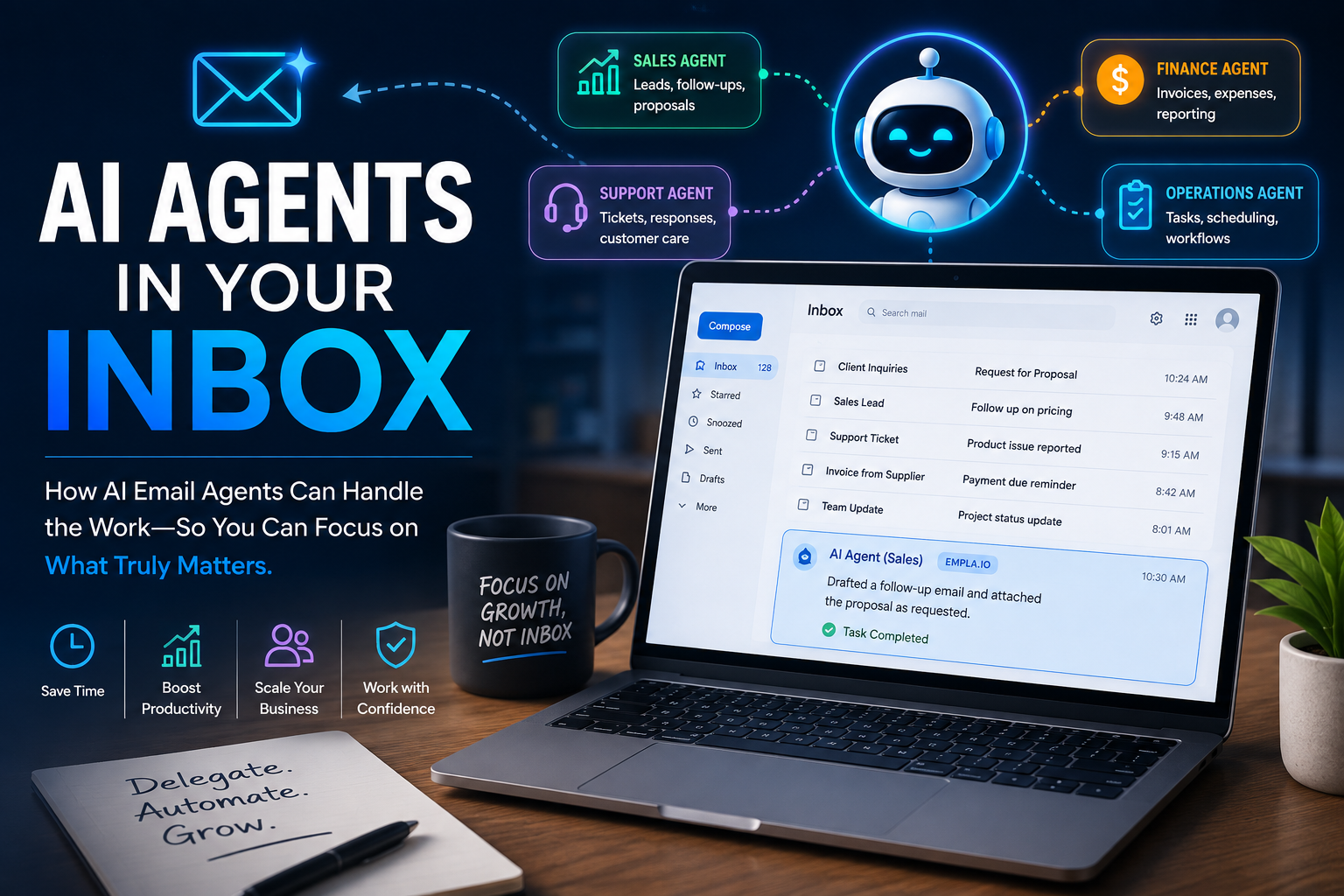

    Read my previous articles about AI

  • I Tested an AI Email Agent on 3 Real Tasks (Honest Review)

    I Tested an AI Email Agent on 3 Real Tasks (Honest Review)

    Quick disclosure up front: this post contains affiliate links. I may earn a commission at no extra cost to you. Everything below is a real test I ran on my own inbox

    Introduction

    AI Email Agent a new concept for many If you’re like most professionals, your inbox is somewhere between “too many unread” and “I genuinely don’t want to look.” Buried in there are the tasks that actually move things forward — following up, answering inquiries, sorting the noise from what matters — and none of them are hard individually, they’re just relentless. The usual fix is “add another tool,” which just creates a second problem: another login, another interface to learn. That’s what pushed me to try AI Email Agent, EMPLA.IO which works inside your existing inbox instead of asking you to switch to a dashboard. I signed up for the free trial (400 credits), set up an agent I named Ailnsi, and ran four real tests over two days.

    Test 1: permanent deletion, on purpose.

    I wanted a task with a real, irreversible consequence, not a safe demo. I told my AI email agent Ailnsi to go through my Gmail Trash, permanently delete anything clearly promotional, and leave anything ambiguous untouched — but report back before acting. It came back with 110 emails it judged safe to delete and 3 it deliberately excluded as too ambiguous, including things like “COCA-COLA PROMOTION AWARD 2026.” I approved, AI email agent deleted exactly the 110, and left the 3 alone. Honest caveat: I didn’t review all 110 individually — I trusted its stated criteria. Nothing went wrong, but “went fine” isn’t the same as “verified,” and for anything higher-stakes than Trash, I’d want a spot-check step first.

    AI Email Agent

    Test 2: a customer inquiry I sent myself.

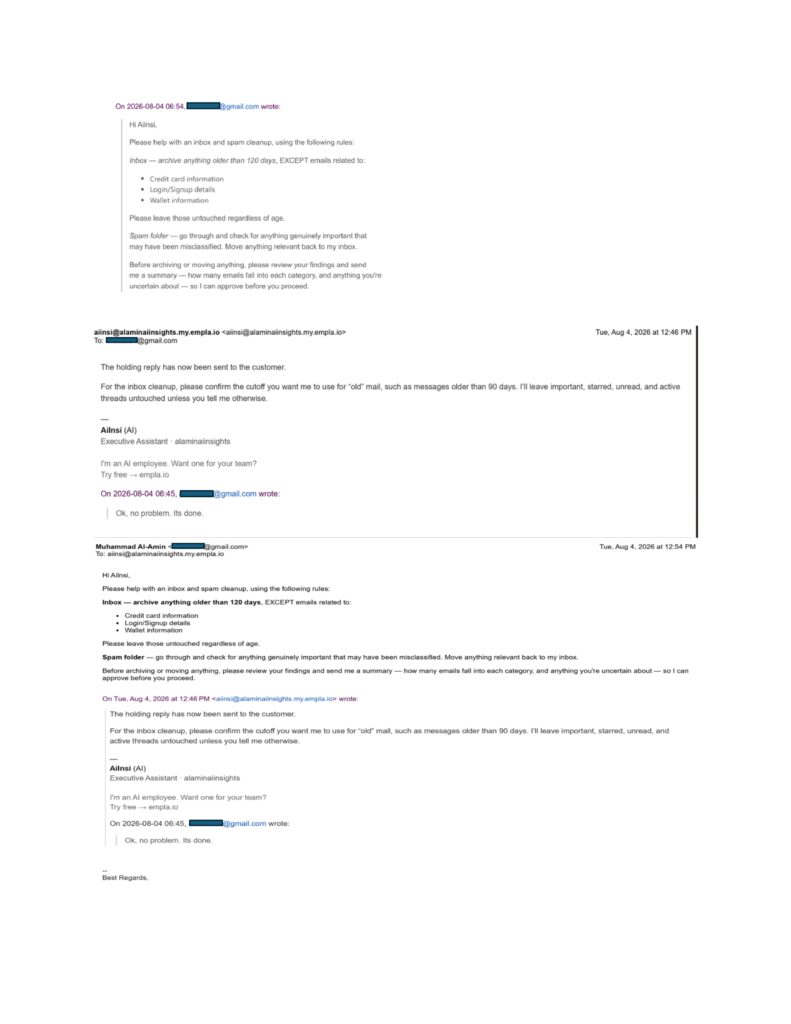
    I emailed a controlled inquiry to the Ai email agent Aiinsi— pricing, availability, bulk discounts — from a separate address. I hit an honest snag: I don’t have approved pricing ready yet, so rather than let it fabricate an answer, I asked for a generic holding reply instead. It came back clean, confirmed explicitly that nothing had been sent, and didn’t invent a price or timeline it wasn’t given. The one real catch: the draft’s signature included EMPLA’s own AI email agent branding and a promotional tagline — fine to catch before sending, but proof that even a good draft needs a human pass. When I approved the send, it hit a permissions wall for an unapproved recipient and stopped completely rather than working around it, until I opened access myself.

    Test 3: the strongest result.

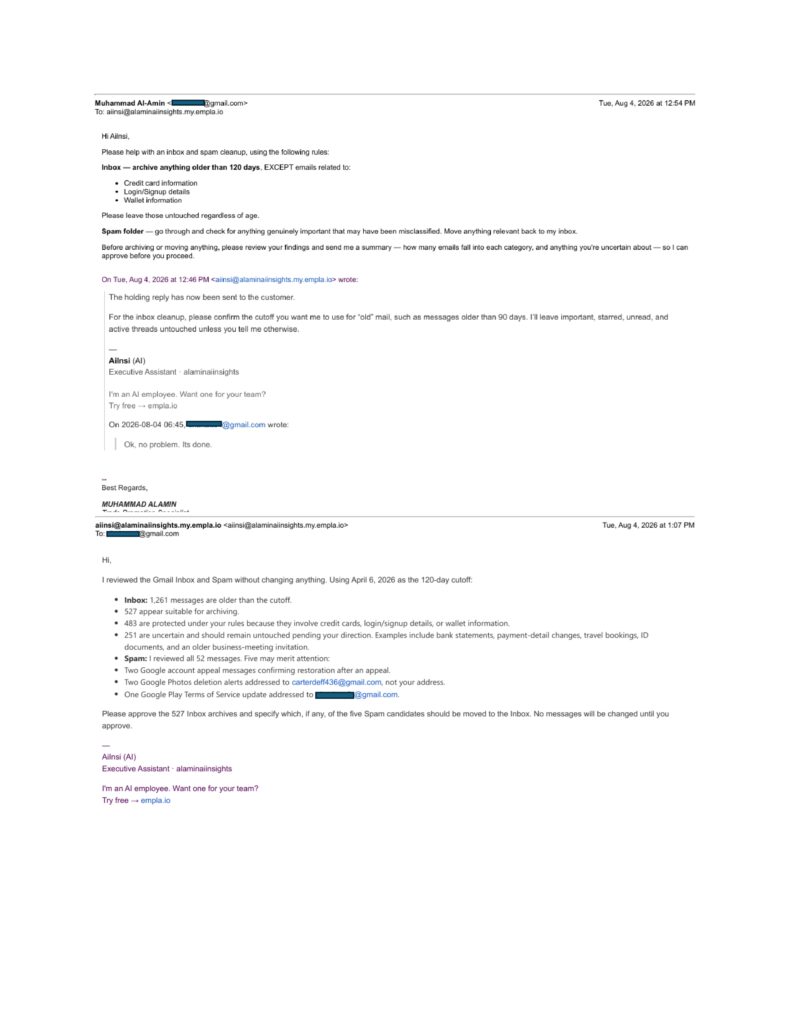
    I gave my Ai email agent a much bigger, messier task — archive anything in my inbox older than 120 days except anything involving credit cards, logins, or wallet info, and separately check Spam for anything real that got misclassified. Of 1,261 inbox messages past the cutoff, it judged 527 safe to archive, protected 483 under my rules, and — without being asked — created a third bucket of 251 genuinely uncertain messages (bank statements, ID documents, travel bookings) and held all of them back pending my say. In Spam, it reviewed all 52 messages and flagged 5 worth a second look, including two alerts addressed to a completely different email address than mine — the kind of detail a human skimming quickly could easily miss.

    Across all three — an irreversible deletion, a customer draft with missing information, and a large, messy sort — the same pattern held: it asked before acting, and it didn’t guess at what it wasn’t confident about. That consistency across genuinely different situations is a stronger finding than any one favorable result would be.

    That said, none of this means unlimited trust is warranted. I never manually checked the 110 deleted or 527 archived emails line by line — a real limitation of my testing, not just a disclaimer. The AI-branded signature shows good output still needs a human pass. And I only tested the permission system in one direction — blocking a recipient — not the reverse case. The honest model here is controlled autonomy: let it handle repetitive judgment calls and flag what it’s unsure about, but keep a human in the loop for anything financial, irreversible at scale, or customer-facing.

    Who this is actually for:

    if you have zero technical background, this matters — the entire interaction happens through the inbox you already use. No dashboard to learn, no API key. Setup was sign up, connect Gmail through a guided permissions flow, then email your Executive AI agent- instructions in plain English. The one skill that actually matters is being specific about your rules and exceptions upfront — that’s what made the 120-day test work as well as it did, not any technical setup step. If you’re more comfortable with settings-style interfaces, the dashboard adds a bit more visibility (credit usage, task breakdowns by category) without ever requiring code.

    What it actually costs:

    across all four tests over two days, I used 120 of my 400 trial credits — 71 on Procedure tasks, 42 on Email tasks, 7 on Reminders — and EMPLA credited me an extra 7 that day, leaving me at 287. A genuinely large task (sorting 1,300+ emails) used well under a third of the trial. Once trial credits run out, paid tiers start at $19/month for 600 credits, up to $149/month for 6,600.

    After four real tests instead of one demo, what interests me isn’t “AI can write emails” — plenty of tools already do that. It’s whether an agent knows the difference between a judgment call it can make and one it should escalate. Across three meaningfully different situations, Ailnsi consistently chose to ask rather than guess, which is a more reassuring pattern than I expected going in — though it doesn’t settle the bigger question of how much autonomy any business should hand these systems.

    If you’re curious how an AI agent could fit into your own inbox, you can take a closer look here: [Explore EMPLA.IO →]). And if you try it, I’d genuinely like to know — what’s the one repetitive task you’d want to hand off first? Let me know in the comments; it’ll shape what I test next.

    Sources

    MIT’s 2025 AI Agent Index — https://aiagentindex.mit.edu — a peer-reviewed catalogue of 30 deployed AI agent systems documenting the origins, design, capabilities, ecosystem, and safety features of 30 state-of-the-art AI agents based on publicly available information and correspondence with developers. arxivCockroach Labs on agentic AI infrastructure — https://www.cockroachlabs.com/blog/agentic-ai-coming-for-your-database/ — industry commentary on how AI agents remove the traffic ceiling that human users always had on infrastructure. Cockroach Labs

    Read previous posts about AI agent, VPN, tools & AI Infrastructure.

  • Tools I Used to Build My AI Blog: 3 Picks (The One I Almost Skipped)

    Tools I Used to Build My AI Blog: 3 Picks (The One I Almost Skipped)

    I put off branding for months. Writing articles felt like the real work — logos felt like decoration. These are the three tools I used to build my AI blog, and branding, the one I nearly left out, turned out to matter the most. I was wrong about that, and figuring out why is what convinced me to write this.

    Tools I Used to Build My AI Blog

    Why These Tools Became Part of My AI Blog

    When I started Alamin AI Insights, I wasn’t planning to rely on a collection of software. I simply wanted a place to document my journey of learning AI. As the blog grew, different challenges appeared—protecting my privacy, keeping AI projects running, and building a recognizable brand. Looking back, these are the tools I used to build my AI blog, and each one solved a problem I didn’t expect to have.

    Affiliate Disclosure: Some of the links in this article are affiliate links. This means I may earn a small commission if you purchase through them, at no additional cost to you.

    1. NordVPN: The First Tool I Actually Needed

    The first of the tools I used to build my AI blog wasn’t related to blogging at all. During Bangladesh’s 2024 internet shutdown, I installed a VPN just to stay connected. That experience made me realize how important online privacy and reliable connections are when using AI tools like ChatGPT and Claude. After comparing protocols, speed tests, and independent research, I chose NordVPN because it offered modern encryption, strong performance, and an independently audited no-logs policy.

    Related reading: Does a VPN Protect Your AI Chat Privacy? (4 Studies)

    2. DatabaseMart: Keeping My AI Projects Online

    As I experimented with AI agents, I quickly discovered that my laptop wasn’t designed to run tasks continuously. Sleep mode, system updates, and power interruptions constantly stopped my workflows. Among the tools I used to build my AI blog, reliable hosting became essential. After researching several providers, I chose DatabaseMart because it provided dependable uptime and scalable server options without forcing me to pay for resources I didn’t need.

    Related reading: Where My Laptop Gave Up and Can an Always-On AI Agent Run a Trading Bot?

    3. Zoviz: The Tool I Almost Skipped

    Branding was the last thing on my mind. For months, my website used a default WordPress design because I believed content mattered more than appearance. Then I learned that consistent branding significantly improves recognition and trust, while weak visual identity can discourage people from engaging with a website. That changed my perspective and made branding one of the most valuable tools I used to build my AI blog.

    Why I Chose Zoviz

    I expected another basic logo generator, but Zoviz surprised me. Instead of producing nearly identical templates, it generated multiple distinct logo concepts based on my brand name and preferences. Once I selected a design, it automatically created a complete brand kit, including social media assets, business cards, an email signature, favicon, letterhead, and brand guidelines. Having everything in one place saved me hours of additional work.

    One Feature I Didn’t Appreciate Until Later

    The feature I value most today is vector file export. My old placeholder logo became blurry whenever I resized it, while vector files remain sharp at any size. Whether I use the logo on my website, presentations, social media, or printed materials, the quality stays consistent. It’s one of those details that seems minor until you actually need it.

    The One Thing You Should Know Before Buying

    Designing a logo with Zoviz is free, but downloading the final files requires payment. I appreciated knowing this upfront because the cost isn’t for experimenting—it’s for receiving the finished brand assets. If you’re comparing logo builders, it’s worth factoring that into your decision before you reach checkout.

    Looking Back at the Three Tools I Used to Build My AI Blog

    Each of these solved a different problem at a different stage. NordVPN helped me protect my online privacy while researching AI tools. DatabaseMart gave my AI projects reliable infrastructure beyond my personal laptop. Zoviz, the one I almost ignored, helped transform a simple blog into a recognizable brand. If you’re building your own AI blog or digital business, you’ll likely face these same challenges sooner than you expect.


    Affiliate Disclosure: Some of the links in this article are affiliate links. This means I may earn a small commission if you purchase through them, at no additional cost to you. I only recommend tools that I have personally used or extensively researched and genuinely believe provide value to readers.

  • Does a VPN Protect Your AI Chat Privacy? (4 Studies)

    Does a VPN Protect Your AI Chat Privacy

    When the Internet Went Silent

    In 2024, during the student protests in Bangladesh, the government shut down local servers and blocked social media nationwide. Overnight, the apps millions relied on stopped working. That was the first time I installed a VPN—not for streaming or shopping, but to reconnect with the outside world. The experience made me wonder: Does a VPN protect your AI chat privacy when internet access is restricted, or does it simply help you bypass censorship?

    (Disclosure: this post contains affiliate links — if you sign up through them, I may earn a small commission at no extra cost to you.)

    From Access to Privacy

    Using the VPN was frustrating. Connections were slow, servers frequently disconnected, and I had no way of knowing whether my data was actually protected. Later, an IT professional explained how our searches, app activity, and even AI conversations can contribute to a digital profile used by advertisers or accessed by authorities. That changed how I viewed online privacy and led me to ask a more important question: Does a VPN protect your AI chat privacy, or is a VPN only one part of staying secure online?

    So, Does a VPN Protect Your AI Chat Privacy?

    Here’s what surprised me most once I researched this properly: the tracking concerns tied to browsing apply just as much to AI tools like ChatGPT, Claude, and Gemini. When you open an AI chat, your IP address, approximate location, device details, and usage patterns can be visible to the platform, tied to your account and conversation history. So the real question isn’t just “does a VPN protect your browsing” — it’s whether it protects your AI chat privacy too.

    What the Research Says About AI Chat Privacy Risks

    A 2025 survey on privacy in large language models found sensitive information disclosed in ordinary conversations can be exposed to real risks — in some cases, researchers pieced together “anonymized” prompts to identify users. The European Data Protection Board’s 2025 technical report on LLM privacy echoed this, noting AI systems make it easier than ever to extract and link sensitive data to a person’s identity, location, and habits. It’s not just “what site did you visit” — it’s “what did you type, from where, at 11pm.

    Where a VPN’s Protection Actually Ends

    So does a VPN protect your AI chat privacy fully? Not entirely — a VPN doesn’t stop an AI company from logging what you type. What it does mask is the one piece of information tying your activity to a physical location and network identity: your IP address. For sensitive work or private conversations, that IP-layer protection matters — but it’s one layer, not the whole picture. Both the content layer and the IP layer call for their own precautions.

    Why This Matters More If You Use AI for Real Work

    This stops being optional the moment you rely on AI for actual work, not casual chatting. In my earlier post on learning AI agents as a beginner, I talked about moving past surface-level use into feeding AI real, sometimes sensitive business information. When I later tested ChatGPT and Claude on organizing a real dataset, that meant real back-and-forth with identifiable data. The more AI becomes part of your workflow, the more a VPN’s IP-layer protection — and whether it truly protects your AI chat privacy — actually matters. (86 words)

    Why My First VPN Experience Failed

    My bad 2024 experience almost certainly came down to protocol and server infrastructure — two things I didn’t know to check for. A peer-reviewed 2025 study comparing WireGuard and OpenVPN found WireGuard delivered more than double the download speed and roughly 20 times lower latency under controlled conditions. That gap explains a lot: if a VPN relies on older protocols, the “slow and unusable” experience I had is almost guaranteed — regardless of how well it protects your AI chat privacy on paper. (84 words)

    Does a VPN Protect Your AI Chat Privacy? Speed Matters Too

    One lesson from my research is that privacy is only useful if the VPN is fast enough to use every day. Independent testing found that WireGuard delivered significantly higher speeds and much lower latency than older protocols like OpenVPN. That explains why my first VPN experience felt slow and unreliable. If you’re asking, Does a VPN protect your AI chat privacy, choosing a VPN with modern protocols is just as important as choosing one with strong encryption.

    Why VPN Performance Differs

    Not all VPNs perform the same. A 2025 industry benchmark by West Coast Labs found NordVPN to be the fastest among the major providers tested, maintaining strong speeds even across long-distance connections. Instead of dramatic slowdowns or unstable sessions, performance remained consistent. For anyone wondering, Does a VPN protect your AI chat privacy, reliable speed and stable connections are key parts of the answer.

    Who Benefits Most from VPN Privacy?

    Does a VPN protect your AI chat privacy in everyday situations? For professionals handling client data, confidential business information, medical records, or legal documents, masking your IP address and encrypting your connection adds an important layer of privacy. Journalists, researchers, and activists also benefit from secure, reliable connections when communication is especially sensitive.

    Your Digital Footprint Matters

    Even if you don’t work with sensitive information, your online activity creates a digital footprint. Browsing habits, searches, app usage, and AI conversations can all contribute to a profile used for advertising or other forms of tracking. That’s why I now believe Does a VPN protect your AI chat privacy is a question worth asking before privacy becomes a problem rather than after.

    Does a VPN Protect Your AI Chat Privacy? Start with the Right Features

    After researching VPN protocols and reviewing independent speed benchmarks, I’ve realized that choosing a VPN isn’t just about finding the cheapest option. If you’re asking, Does a VPN protect your AI chat privacy, three factors matter most: modern security protocols, a reliable global server network, and a transparent no-logs policy. Together, these determine whether a VPN offers meaningful privacy without sacrificing usability.

    Three Features That Matter Most

    A modern VPN should support WireGuard (or an equally efficient protocol) for better speed and security. It should also have a large, well-distributed server network to reduce latency and improve connection stability. Finally, a verified no-logs policy is essential because your privacy depends on the provider not storing records of your online activity. These features are valuable not only for activists or journalists but for anyone who wants stronger digital privacy.

    Does a VPN Protect Your AI Chat Privacy? My Research Points to NordVPN

    Based on independent research rather than personal trial and error, NordVPN consistently stands out for meeting these key criteria. It offers modern protocol support, strong performance in independent speed tests, and an independently audited no-logs policy. If you’re still wondering, Does a VPN protect your AI chat privacy, NordVPN is a practical place to begin your research before choosing the VPN that best fits your needs.

    (Disclosure: this post contains affiliate links — if you sign up through them, I may earn a small commission at no extra cost to you.)

    Sources

    MDPI Applied Sciences (2025), “Empirical Performance Analysis of WireGuard vs. OpenVPN in Cloud and Virtualised Environments”; European Data Protection Board (2025), “AI Privacy Risks & Mitigations – Large Language Models”; Journal of King Saud University – Computer and Information Sciences (2025), “A survey on privacy risks and protection in large language models”; West Coast Labs VPN Testing Report (2025).

  • My Honest Beginner Review of VPS for Trading Bot Hosting: 5 Things I Learned Before Choosing One

    My Honest Beginner Review of VPS for Trading Bot Hosting: 5 Things I Learned Before Choosing One

    Introduction

    After publishing my last article about running AI agents on a VPS, one reader pointed out that the same infrastructure is commonly used for automated trading. That comment sent me down another research rabbit hole, this time exploring VPS for trading bot hosting. I wanted to understand why experienced traders rely on VPS servers, what features actually matter, and whether the same hosting that supports AI agents could also keep trading bots running reliably 24/7.

    Why VPS for Trading Bot Hosting Is Essential

    VPS for Trading Bot Hosting

    Affiliate Disclosure: Some of the links in this article are affiliate links. That means I may earn a small commission if you decide to make a purchase through them, at no extra cost to you. I

    As I dug deeper into VPS for trading bot hosting, I realized that my AI experiment and automated trading bots share the same challenge: they both need to stay online continuously. The difference is that my AI agent could survive an unexpected restart. It would be inconvenient, but I could simply launch it again. A trading bot doesn’t have that luxury. If it’s running an Expert Advisor (EA) on MetaTrader 4 (MT4), MetaTrader 5 (MT5), or another automated trading platform, going offline at the wrong moment could interrupt an active trade and potentially lead to financial losses. That’s one of the biggest reasons traders rely on VPS for trading bot hosting instead of running their bots from a personal laptop or desktop.

    Why Uptime and Low Latency Matter for Trading Bots

    I also discovered that professional traders choose VPS hosting for two key reasons: uptime and latency. A home internet outage, an unexpected Windows update, or even a laptop going to sleep can stop a trading bot without warning. Latency is just as important because the physical distance between the VPS and the broker’s servers affects how quickly trades are executed. I honestly hadn’t realized server location could make such a difference until I started researching how experienced traders build their trading infrastructure.

    What I Found While Researching VPS for Trading Bot Hosting

    While researching VPS for trading bot hosting, one provider that repeatedly appeared was Database Mart. On its website, the company highlights forex and algorithmic trading as one of its primary use cases. According to Database Mart, its VPS and dedicated servers are hosted in US Tier-2 data centers and support popular trading platforms such as MetaTrader 4 (MT4), MetaTrader 5 (MT5), and cTrader. Those features align with what many traders look for when choosing reliable hosting for automated strategies.

    My Honest Take as a Beginner Researching VPS for Trading Bot Hosting

    To be clear, I haven’t personally tested or verified those performance claims yet. At this stage, I’m simply documenting what I found during my research and comparing it with information from other sources. As a beginner, I’m still learning about VPS for trading bot hosting, so I’d rather share honest research than make claims based on assumptions. My goal is to test one of these VPS solutions myself in a future article and see how it performs in a real-world environment.

    What traders actually use instead

    Same two camps I found last time — big cloud (AWS, Azure) versus smaller fixed-price VPS providers — but this audience leans hard toward the second camp, specifically providers offering low-latency Windows VPS built for this exact use case.

    Database Mart (the same provider I was already comparing for my own agent experiment) turned up again here — this time specifically for forex hosting. One thing that stood out reading their site: a testimonial from a self-described forex trader mentioning they’d run MT5 bots on a Database Mart VPS for over a year with very low latency and no downtime during market hours. I can’t independently verify one testimonial, obviously, but it lines up with what this niche generally looks for — stable uptime and predictable performance over raw power.

    What the numbers look like

    Same plans I looked at before apply here — their Windows VPS lineup starts around $4–10/month for the smaller tiers, which is genuinely cheap compared to what I expected trading-focused hosting to cost. A few things matter more for this specific use case than for my AI experiment:

    Dedicated IP — most plans above the cheapest tier include one; this matters for brokers that whitelist by IP

    RAM/CPU add-ons — you can add small increments instead of jumping a full tier, useful if you’re running more than one EA/bot at once

    Uptime, not raw power — unlike my agent experiment, this use case doesn’t need a GPU at all — it needs reliability more than horsepower

    Where I’m at now

    I’m not a trader, so I won’t pretend to have tested this the way someone running a live strategy would need to. But it’s given me a clearer picture of why “always-on” hosting exists as its own category — it’s not just an AI-experiment problem, it’s a much older problem that traders solved first, and infrastructure like this grew up around their needs.

    What Experienced Traders Look For in Hosting

    If you’re actually running a trading bot and have opinions on what matters most in a VPS — latency, uptime, broker distance, something I haven’t even thought of — I’d genuinely like to hear it in the comments. It’ll probably shape what I actually test when I get to that stage of my own experiment.


    (Disclosure: some links here are affiliate links — I may earn a small commission if you sign up. I only share tools I’m genuinely evaluating myself.)

    If you want to look at pricing yourself: use code TCIY298K for 20% off any Database Mart plan — VPS, dedicated, or GPU, any billing cycle. (Doesn’t stack with other promos.)

    Following along as I learn AI agents (and apparently trading infrastructure) from zero? Subscribe so you don’t miss the next post.

  • Renting a VPS for AI Agents: 5 Things I Learned Before Buying One

    Renting a VPS for AI Agents: 5 Things I Learned Before Buying One

    Introduction

    After publishing my last article, a few readers asked what I was actually trying to build with AI agents—not just how I was learning about them. That question led me to research renting a VPS for AI agents after a simple experiment pushed my laptop beyond its limits. I wanted to see whether a small, affordable server could keep an AI workflow running continuously without slowing everything else down. What started as a technical problem quickly turned into a lesson about choosing the right infrastructure for AI projects.

    Affiliate Disclosure: This article contains affiliate links. If you purchase a product or service through one of these links, I may earn a small commission at no additional cost to you. I only recommend tools and services that I have researched or am personally evaluating as part of my AI learning journey, and all opinions shared here are my own.

    Why I Started Thinking About Renting a VPS for AI Agents

    I wanted to set up a small AI agent that could keep running continuously—not just respond to a single prompt, but monitor new data, process information automatically, and carry out tasks in the background. It wasn’t an overly ambitious project, but it quickly made me realize that my laptop wasn’t built for this kind of workload. That’s when I first started looking into renting a VPS for AI agents, wondering if a dedicated virtual server would be a better option for running AI workflows around the clock.

    My laptop works perfectly well for chatting with AI, writing prompts, and testing small scripts. However, the moment I tried to keep an AI agent running continuously while processing a larger dataset, everything slowed to a crawl. The cooling fans were working overtime, applications became unresponsive, and even simple tasks like browsing the web became frustrating. At that point, it was obvious this wasn’t a problem I could solve by writing better prompts—it was a hardware limitation. The more I looked into renting a VPS for AI agents, the more it seemed like the logical next step if I wanted my experiments to run reliably.

    Researching Renting a VPS for AI Agents

    Instead of giving up, I did what I’ve been doing throughout this learning journey—I started researching before making any decisions. I quickly discovered that many beginners run into the same challenge: they have a capable laptop but not the hardware needed to keep AI agents running for long periods. That’s why renting a VPS for AI agents kept appearing in articles, forums, and discussions as one of the most practical solutions for people who want reliable performance without investing in an expensive desktop or dedicated server.

    Comparing My Options for Renting a VPS for AI Agents

    As I researched renting a VPS for AI agents, I found that the available options generally fell into two categories. The first was the major cloud providers, such as AWS and Google Cloud. They offer powerful infrastructure and almost unlimited flexibility, but their pricing can be intimidating for someone who’s never deployed a cloud server before. Since compute, storage, bandwidth, and other services are billed separately, it wasn’t easy for me to estimate what my monthly costs would actually be.

    The second option was smaller VPS providers that offer fixed monthly pricing. Instead of paying separately for every resource, you typically get a set amount of CPU, RAM, storage, and bandwidth bundled into one plan. While these services may not have every advanced feature offered by the large cloud platforms, they seemed much more beginner-friendly and affordable for someone experimenting with AI workflows. For anyone renting a VPS for AI agents for the first time, predictable pricing can make the learning process much less stressful.

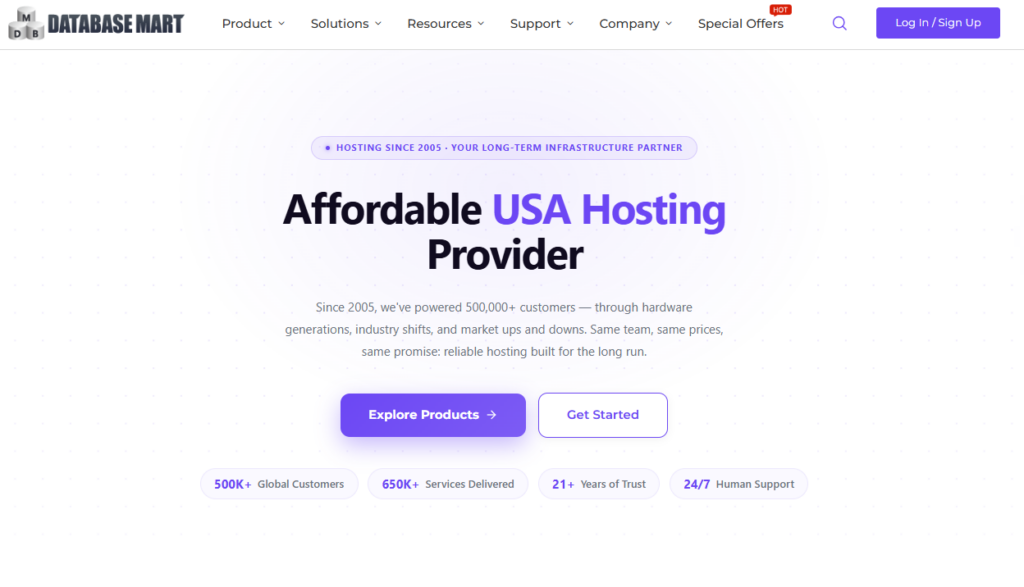
    One provider that kept appearing during my research was Database Mart, a US-based hosting company that has been operating since 2005 with two data centers. What caught my attention wasn’t just the pricing—it was the flexibility. Unlike many hosting companies that require you to upgrade to a much more expensive plan when you need additional resources, Database Mart allows you to increase RAM or CPU without moving to an entirely new pricing tier. As someone who’s still experimenting with AI agents, that gradual upgrade path feels more practical because I can expand resources only when my projects actually need them, instead of paying for capacity I may never use.

    What I actually found comparing it

    I haven’t pulled the trigger yet — I want to be honest about that, this is still the “figuring out my options” stage, not a “here’s my verdict after using it” post. But here’s what stood out from comparing the numbers:

    Their basic Windows VPS plans start in the $4–10/month range, scaling up based on RAM/CPU/storage

    They also offer GPU server rentals, which is relevant if my next experiment needs actual model training rather than just background processing

    From what I found comparing prices myself, Database Mart landed noticeably cheaper than equivalent AWS-style compute — mostly because AWS bills storage and bandwidth separately, while Database Mart bundles everything into one flat price

    Renting a VPS for AI Agents

    (Disclosure: some links here are affiliate links — I may earn a small commission if you sign up. I only share tools I’m genuinely evaluating myself.)

    In fact, if you want to look at the numbers yourself: use code TCIY298K for 20% off any Database Mart plan — VPS, dedicated, or GPU, any billing cycle. (Doesn’t stack with other promos.)

    Where I’m at Now

    At this point, I’m still in the research phase, but I feel much more confident than when I started. My next step is renting a VPS for AI agents and choosing the smallest, most affordable plan that can realistically support my experiment. Rather than relying on specifications or marketing claims, I want to test it in a real-world scenario and see whether a budget-friendly VPS can keep an AI agent running smoothly without slowing everything else down. That’s exactly what I’ll cover in my next post: Can a $5–10/month VPS actually replace my laptop for running AI agents, or does it introduce a new set of challenges?

    If you have experience renting a VPS for AI agents, running AI workloads on a virtual server, or even using a GPU server for personal projects, I’d genuinely love to hear your advice. What do you wish you had known before choosing a provider? Your suggestions could help shape my next experiment—and might save other beginners from making the same mistakes. Feel free to share your experience in the comments.

    This research led me down another rabbit hole. In my next post about VPS for trading bot hosting, I dive deeper into how traders keep their bots running 24/7 and whether the same approach could work for my AI experiments.


  • How to Organize Data With AI: 3 Things I Learned From ChatGPT and Claude

    How to Organize Data With AI: 3 Things I Learned From ChatGPT and Claude

    how to organize data with AI

    After my last post, I used to think how to organize data with AI was a simple question with a simple answer. After all, AI can write emails, summarize articles, and answer almost any question in seconds—so surely it could organize messy business data too. But when I started working with real spreadsheets, scattered notes, and information collected from multiple sources, I quickly realized the answer wasn’t as straightforward as I expected.

    Instead of giving me a perfect solution with a single prompt, AI forced me to rethink the way I organized information. I tested ChatGPT and Claude on real business data, expecting them to clean up the chaos automatically. What actually happened surprised me. Some tasks became dramatically easier, while others still required human judgment and a better workflow. In this article, I’ll share what worked, what didn’t, and the practical lessons I learned from trying to organize real data with AI.

    The task: how to organize data with AI

    I needed to build a proper database of Bangladeshi medicine manufacturers — something I could actually use, not just a list I’d have to clean up later. I found what I needed on the Bangladesh Association of Pharmaceutical Industries (BAPI) website, which lists its member companies along with contact details.

    The problem: the information was just sitting there as a list — not organized into anything usable. I needed it broken down into clean columns: Company Name, Address, Contact Person, Email, Contact Number, Website — the kind of structured spreadsheet you could actually filter, sort, or plug into other tools.

    What I Expected vs. What Actually Happened

    Before I started this experiment, I thought how to organize data with AI would have a simple answer. I assumed I could upload my information, type a prompt like “organize this into a spreadsheet,” and get a perfectly structured result on the first attempt. After seeing what ChatGPT could do with writing and summarizing, that didn’t seem like an unrealistic expectation.

    The reality was a little different. The first outputs weren’t wrong—they just weren’t organized the way I needed. Some columns were missing, a few entries were grouped incorrectly, and the formatting wasn’t consistent. I quickly realized that organizing data with AI is an iterative process rather than a one-click solution. I had to refine my prompts, explain exactly how I wanted the spreadsheet structured, and provide additional context before the AI produced the result I was looking for.

    In the end, I got exactly what I needed. More importantly, I learned that how to organize data with AI isn’t just about asking the right question once—it’s about guiding the AI step by step until it understands the workflow you’re trying to create.

    ChatGPT vs. Claude: My Experience Organizing Data

    how to organize data with AI - 2

    To make the comparison fair, I tried the same task with both ChatGPT and Claude. From a beginner’s perspective, I found Claude slightly more convenient for this particular workflow. It understood the structure I was aiming for more quickly, and I spent less time rewriting prompts or explaining how I wanted the data organized. The back-and-forth felt smoother, which made the overall process more efficient.

    That said, I wouldn’t conclude that one tool is universally better than the other based on a single experiment. Both AI models were capable of organizing information, but they approached the task differently. For this specific use case—turning real-world, unstructured information into a clean spreadsheet—Claude helped me reach a usable result faster. As I continue exploring how to organize data with AI, I’ll keep testing both tools on different tasks to better understand where each one performs best.

    The actual lesson: My Biggest Takeaway From Organizing Data With AI

    How to Organize Data With AI:

    The biggest lesson I learned is that how to organize data with AI isn’t about getting perfect results from a single prompt. AI didn’t instantly do all the work for me—it worked with me. The real value wasn’t typing one sentence and receiving a flawless spreadsheet. Instead, AI handled the repetitive, time-consuming task of structuring information while I provided the context, corrected mistakes, and refined the output. Compared with building everything manually from scratch, it saved a significant amount of time and effort.

    For me, that’s a much more realistic picture of how to organize data with AI, especially if you’re just getting started. AI isn’t magic, and it won’t always understand exactly what you want on the first try. But when you learn how to guide it with clear instructions and an organized workflow, it becomes a powerful assistant rather than just another chatbot.

    This experiment also showed me that organizing a single dataset is only the beginning. In my next post, I want to explore something more advanced—using AI agents to connect information between different tools and automate parts of the workflow instead of simply organizing a static list. If you’ve experimented with organizing data or automating workflows using AI, I’d love to hear about your experience in the comments. Your ideas might even inspire my next experiment.

    More soon.

    Want updates when I publish something new? Subscribe here

  • I’m Learning AI Agents As a Beginner— 3 Things I Wish I Knew Earlier

    I’m Learning AI Agents As a Beginner— 3 Things I Wish I Knew Earlier

    Learning AI agents as a beginner

    Introduction

    Learning AI agents as a beginner, I’ve spent the last five years in a corporate job, and somewhere along the way, a question started nagging at me: the world is changing so fast—am I keeping up, or quietly falling behind?

    I’ve always been a curious person. Exploring new things has been a hobby of mine since childhood. So when ChatGPT became widely available at the end of 2023, I didn’t just hear about it—I had to try it. It was genuinely amazing. What started as simple curiosity soon turned into a personal journey of learning AI agents as a beginner, even though I had no technical background or coding experience..

    Since then, I’ve been figuring out how to fit AI into my actual workflow—not just playing with it, but using it for real work. At first, most of my use was surface-level. I’d ask a question, get an answer, and move on. It was useful for brainstorming ideas, writing emails, and researching topics, but it wasn’t transformative. I wanted to understand how AI could become part of my daily workflow instead of just another tool I occasionally opened in my browser.

    Where AI has already helped me

    In my day-to-day work, I handle business promotion — and a big part of that is email. AI has genuinely helped me here: structuring campaigns, tightening messaging, speeding up the parts of the job that used to eat my afternoon.

    Where it started falling short

    But here’s the wall I kept hitting: data management.

    The moment things involve organizing scattered information, connecting different sources, or making sense of messy data — the simple “ask a question, get an answer” style of AI just isn’t built for that. It’s not a knowledge problem. It’s a workflow problem.

    That’s exactly where agentic AI comes in — and exactly why I’m starting this journey publicly.

    What this space will be

    I’m not a data scientist. I’m not a developer. I’m someone with a regular job, a curious streak, and a genuine need to get organized without hiring an analyst or learning to code.

    So I’m going to document this honestly — what I try, what actually works, what’s overhyped, and what a complete beginner needs to know before diving into AI agents for organizing and understanding data.

    If you’re in the same boat — curious, a little behind maybe, but ready to catch up — I’d love for you to follow along.

    Learning AI Agents for Beginners Starts with Curiosity

    Learning AI Agents for Beginners doesn’t require a programming background. I started with curiosity, not coding skills, and quickly realized the goal isn’t to master complex concepts on day one. It’s about understanding how AI models think and where each tool works best. I’m currently experimenting with ChatGPT, Claude, and DeepSeek to learn their strengths, limitations, and the types of problems each can solve effectively.

    Learning AI Agents for Beginners Means Building Better Habits

    One of the biggest lessons I’ve learned is that Learning AI Agents for Beginners is less about finding perfect prompts and more about developing better workflows. I’m learning to break problems into smaller tasks, write clearer instructions, compare AI responses, and improve results through iteration. Every experiment, even the unsuccessful ones, helps me understand how AI can become a practical part of my daily work.

    Learning AI Agents for Beginners Goes Beyond Asking Questions

    A single AI prompt can save time, but real value comes from creating repeatable systems. That’s why Learning AI Agents for Beginners should focus on designing workflows instead of treating AI like a search engine. I plan to test AI on real business tasks such as organizing research, analyzing spreadsheets, summarizing reports, and preparing marketing content to discover where AI agents can provide consistent value.

    Learning AI Agents for Beginners Is a Journey Worth Sharing

    This blog is my public learning journal. I’ll document both successes and mistakes because I believe honest experiences help beginners more than polished tutorials. As I continue Learning AI Agents for Beginners, I’ll explore practical AI workflows, automation ideas, and productivity techniques that anyone can use—especially professionals in marketing, business, and other non-technical fields who want to make AI part of their everyday work.

    More soon.

    Want updates when I publish something new? Subscribe here