Tag: VPS Hosting

  • Tools I Used to Build My AI Blog: 3 Picks (The One I Almost Skipped)

    Tools I Used to Build My AI Blog: 3 Picks (The One I Almost Skipped)

    I put off branding for months. Writing articles felt like the real work — logos felt like decoration. These are the three tools I used to build my AI blog, and branding, the one I nearly left out, turned out to matter the most. I was wrong about that, and figuring out why is what convinced me to write this.

    Tools I Used to Build My AI Blog

    Why These Tools Became Part of My AI Blog

    When I started Alamin AI Insights, I wasn’t planning to rely on a collection of software. I simply wanted a place to document my journey of learning AI. As the blog grew, different challenges appeared—protecting my privacy, keeping AI projects running, and building a recognizable brand. Looking back, these are the tools I used to build my AI blog, and each one solved a problem I didn’t expect to have.

    Affiliate Disclosure: Some of the links in this article are affiliate links. This means I may earn a small commission if you purchase through them, at no additional cost to you.

    1. NordVPN: The First Tool I Actually Needed

    The first of the tools I used to build my AI blog wasn’t related to blogging at all. During Bangladesh’s 2024 internet shutdown, I installed a VPN just to stay connected. That experience made me realize how important online privacy and reliable connections are when using AI tools like ChatGPT and Claude. After comparing protocols, speed tests, and independent research, I chose NordVPN because it offered modern encryption, strong performance, and an independently audited no-logs policy.

    Related reading: Does a VPN Protect Your AI Chat Privacy? (4 Studies)

    2. DatabaseMart: Keeping My AI Projects Online

    As I experimented with AI agents, I quickly discovered that my laptop wasn’t designed to run tasks continuously. Sleep mode, system updates, and power interruptions constantly stopped my workflows. Among the tools I used to build my AI blog, reliable hosting became essential. After researching several providers, I chose DatabaseMart because it provided dependable uptime and scalable server options without forcing me to pay for resources I didn’t need.

    Related reading: Where My Laptop Gave Up and Can an Always-On AI Agent Run a Trading Bot?

    3. Zoviz: The Tool I Almost Skipped

    Branding was the last thing on my mind. For months, my website used a default WordPress design because I believed content mattered more than appearance. Then I learned that consistent branding significantly improves recognition and trust, while weak visual identity can discourage people from engaging with a website. That changed my perspective and made branding one of the most valuable tools I used to build my AI blog.

    Why I Chose Zoviz

    I expected another basic logo generator, but Zoviz surprised me. Instead of producing nearly identical templates, it generated multiple distinct logo concepts based on my brand name and preferences. Once I selected a design, it automatically created a complete brand kit, including social media assets, business cards, an email signature, favicon, letterhead, and brand guidelines. Having everything in one place saved me hours of additional work.

    One Feature I Didn’t Appreciate Until Later

    The feature I value most today is vector file export. My old placeholder logo became blurry whenever I resized it, while vector files remain sharp at any size. Whether I use the logo on my website, presentations, social media, or printed materials, the quality stays consistent. It’s one of those details that seems minor until you actually need it.

    The One Thing You Should Know Before Buying

    Designing a logo with Zoviz is free, but downloading the final files requires payment. I appreciated knowing this upfront because the cost isn’t for experimenting—it’s for receiving the finished brand assets. If you’re comparing logo builders, it’s worth factoring that into your decision before you reach checkout.

    Looking Back at the Three Tools I Used to Build My AI Blog

    Each of these solved a different problem at a different stage. NordVPN helped me protect my online privacy while researching AI tools. DatabaseMart gave my AI projects reliable infrastructure beyond my personal laptop. Zoviz, the one I almost ignored, helped transform a simple blog into a recognizable brand. If you’re building your own AI blog or digital business, you’ll likely face these same challenges sooner than you expect.


    Affiliate Disclosure: Some of the links in this article are affiliate links. This means I may earn a small commission if you purchase through them, at no additional cost to you. I only recommend tools that I have personally used or extensively researched and genuinely believe provide value to readers.
  • Renting a VPS for AI Agents: 5 Things I Learned Before Buying One

    Renting a VPS for AI Agents: 5 Things I Learned Before Buying One

    Introduction

    After publishing my last article, a few readers asked what I was actually trying to build with AI agents—not just how I was learning about them. That question led me to research renting a VPS for AI agents after a simple experiment pushed my laptop beyond its limits. I wanted to see whether a small, affordable server could keep an AI workflow running continuously without slowing everything else down. What started as a technical problem quickly turned into a lesson about choosing the right infrastructure for AI projects.

    Affiliate Disclosure: This article contains affiliate links. If you purchase a product or service through one of these links, I may earn a small commission at no additional cost to you. I only recommend tools and services that I have researched or am personally evaluating as part of my AI learning journey, and all opinions shared here are my own.

    Why I Started Thinking About Renting a VPS for AI Agents

    I wanted to set up a small AI agent that could keep running continuously—not just respond to a single prompt, but monitor new data, process information automatically, and carry out tasks in the background. It wasn’t an overly ambitious project, but it quickly made me realize that my laptop wasn’t built for this kind of workload. That’s when I first started looking into renting a VPS for AI agents, wondering if a dedicated virtual server would be a better option for running AI workflows around the clock.

    My laptop works perfectly well for chatting with AI, writing prompts, and testing small scripts. However, the moment I tried to keep an AI agent running continuously while processing a larger dataset, everything slowed to a crawl. The cooling fans were working overtime, applications became unresponsive, and even simple tasks like browsing the web became frustrating. At that point, it was obvious this wasn’t a problem I could solve by writing better prompts—it was a hardware limitation. The more I looked into renting a VPS for AI agents, the more it seemed like the logical next step if I wanted my experiments to run reliably.

    Researching Renting a VPS for AI Agents

    Instead of giving up, I did what I’ve been doing throughout this learning journey—I started researching before making any decisions. I quickly discovered that many beginners run into the same challenge: they have a capable laptop but not the hardware needed to keep AI agents running for long periods. That’s why renting a VPS for AI agents kept appearing in articles, forums, and discussions as one of the most practical solutions for people who want reliable performance without investing in an expensive desktop or dedicated server.

    Comparing My Options for Renting a VPS for AI Agents

    As I researched renting a VPS for AI agents, I found that the available options generally fell into two categories. The first was the major cloud providers, such as AWS and Google Cloud. They offer powerful infrastructure and almost unlimited flexibility, but their pricing can be intimidating for someone who’s never deployed a cloud server before. Since compute, storage, bandwidth, and other services are billed separately, it wasn’t easy for me to estimate what my monthly costs would actually be.

    The second option was smaller VPS providers that offer fixed monthly pricing. Instead of paying separately for every resource, you typically get a set amount of CPU, RAM, storage, and bandwidth bundled into one plan. While these services may not have every advanced feature offered by the large cloud platforms, they seemed much more beginner-friendly and affordable for someone experimenting with AI workflows. For anyone renting a VPS for AI agents for the first time, predictable pricing can make the learning process much less stressful.

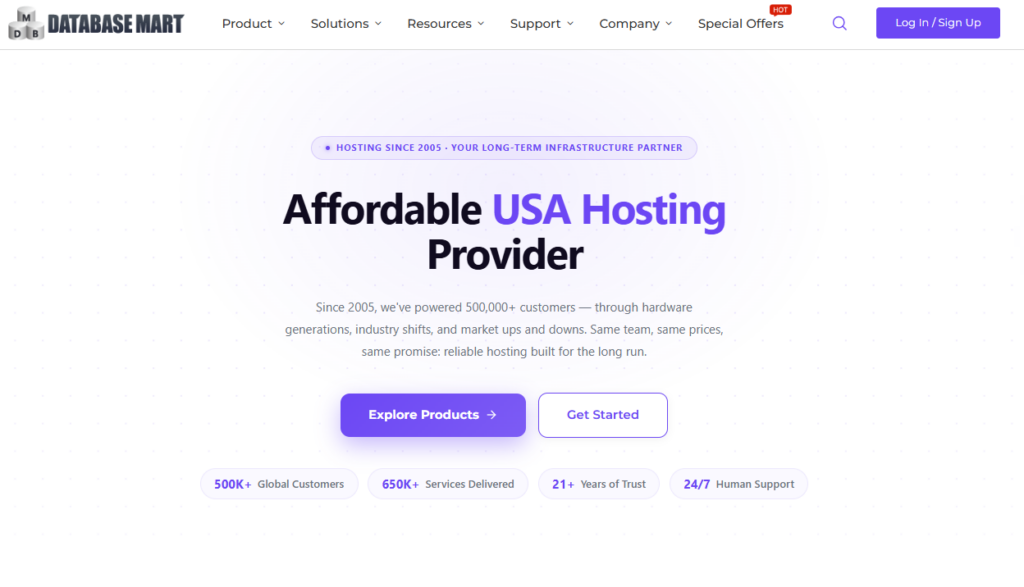
    One provider that kept appearing during my research was Database Mart, a US-based hosting company that has been operating since 2005 with two data centers. What caught my attention wasn’t just the pricing—it was the flexibility. Unlike many hosting companies that require you to upgrade to a much more expensive plan when you need additional resources, Database Mart allows you to increase RAM or CPU without moving to an entirely new pricing tier. As someone who’s still experimenting with AI agents, that gradual upgrade path feels more practical because I can expand resources only when my projects actually need them, instead of paying for capacity I may never use.

    What I actually found comparing it

    I haven’t pulled the trigger yet — I want to be honest about that, this is still the “figuring out my options” stage, not a “here’s my verdict after using it” post. But here’s what stood out from comparing the numbers:

    Their basic Windows VPS plans start in the $4–10/month range, scaling up based on RAM/CPU/storage

    They also offer GPU server rentals, which is relevant if my next experiment needs actual model training rather than just background processing

    From what I found comparing prices myself, Database Mart landed noticeably cheaper than equivalent AWS-style compute — mostly because AWS bills storage and bandwidth separately, while Database Mart bundles everything into one flat price

    Renting a VPS for AI Agents

    (Disclosure: some links here are affiliate links — I may earn a small commission if you sign up. I only share tools I’m genuinely evaluating myself.)

    In fact, if you want to look at the numbers yourself: use code TCIY298K for 20% off any Database Mart plan — VPS, dedicated, or GPU, any billing cycle. (Doesn’t stack with other promos.)

    Where I’m at Now

    At this point, I’m still in the research phase, but I feel much more confident than when I started. My next step is renting a VPS for AI agents and choosing the smallest, most affordable plan that can realistically support my experiment. Rather than relying on specifications or marketing claims, I want to test it in a real-world scenario and see whether a budget-friendly VPS can keep an AI agent running smoothly without slowing everything else down. That’s exactly what I’ll cover in my next post: Can a $5–10/month VPS actually replace my laptop for running AI agents, or does it introduce a new set of challenges?

    If you have experience renting a VPS for AI agents, running AI workloads on a virtual server, or even using a GPU server for personal projects, I’d genuinely love to hear your advice. What do you wish you had known before choosing a provider? Your suggestions could help shape my next experiment—and might save other beginners from making the same mistakes. Feel free to share your experience in the comments.

    This research led me down another rabbit hole. In my next post about VPS for trading bot hosting, I dive deeper into how traders keep their bots running 24/7 and whether the same approach could work for my AI experiments.